
Overview: Nudge is a reminder app having the functionality of an alarm, calendar, and notes all in one place.
The goal of Nudge is to provide an easy, user-friendly experience to those who need assistance in maintaining a timely schedule.
Role: User Researcher, UI/UX Designer, User Testing
Tools: Figma, Miro, Draw.io, Excel, Pencil & Paper
Research
Affinity Mapping
The objective of this research is to find the strengths and weaknesses of each methods people of used to set their reminders and how they feel about it.
Here, I have conducted 5 interviews and organized them to five themes:
Convenience
Organization
Assurance
Customization
Urgency
Click on image for full view
Empathy Mapping
Focusing on users and their perspectives and relationships with their reminders.
Click on image for full view
Persona #1
Click on image for full view
Persona #2
Click on image for full view
How Might We…?
How might we reassure anxious users who tend to be forget with their reminders?
How might we support users who finished their task and give them satisfaction in their accomplishments?
How might we reduce the negative emotions users feel when they miss out on their reminders?
How might we create a process to help users manage their schedule efficiently?
How might we create a process to help users manage their schedule efficiently?
Ideation and Design
User Stories and MVP
Click on image for full view
Red Routes User Flow
By identifying the red routes of the application, we can pinpoint the core processes that users will take when using Nudge.
The main purpose is to illustrate the three core routes that users will be taking in order to create the three type of reminders based on user needs: alarm, calendar, and notes.
Click on image for full view
Wireframes
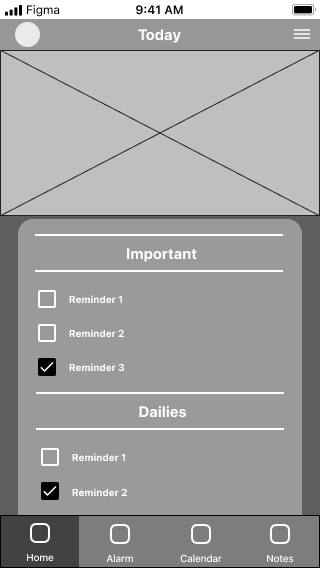

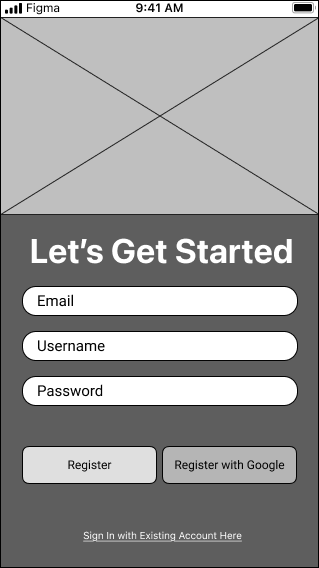

While designing the wireframes, there are some things that I kept in mind:
1. Designs must be familiar with users who have experience with other reminder apps to minimize confusion and need to learn new features.
2. Users have to feel encouraged and motivated to use Nudge.
3. Pinpoint user frustration points from their previous experience. For users who have used previous reminder apps, it is important to think about why they would move to Nudge. What are things that users are currently frustrated with their current app that would make them switch?
4. Ensure user experience is seamless and easy, making sure that users do not have difficulty creating reminders or keeping track of them.
Branding
Every product needs its brand, its identity. Nudge is no different. While designing Nudge, I thought of the core things that Nudge was supposed to represent to its users and what its purpose was.
Mission: Providing tools and thoughtful guidance to make creating reminders more meaningful.
Personality: A familiar, supportive friend that you trust to keep you on track.
Attribute: Reliable, Gentle, Patient, Efficient, Easy
Colors
Primary Color: #212121
Secondary Color: #FFC58C
Neutralizer: #353535
High Fidelity Screens

Usability Testing
Feedback and Iterations
Issue 1: Users initially were unaware that the alarm sound/vibration/snooze settings were available through the creation screen.
Solution: Implement an arrow icon to where the toggle button is, indicating that the field has a more detailed selection to the user.
Before
After
After
Before
Click on images for full view
Issue 2: Home and Calendar screens felt like they share too many similar functions.
Solution: Add more functionality on the home screen. This is done by adding all three reminders - alarm, calendar, and (pinned) notes to the home screen so users will have quicker access to important information instantly.
Click on images for full view
Issue 3: Notes felt too lackluster/empty for certain users who have an idea of what they want to do.
Solution: Add a layout screen in between would be beneficial, allowing users to select the layout they want before entering the creation screen. The main three layouts will be displayed as blank, list, and saved template.
Click on image for full view
Addition
Outcome
Feedback 1: The overall design of Nudge was well received as users like the mood that it set.
Many users expressed how much they liked the aesthetic of the application. Not only was it relaxing, but the colors blended well together and created this sense of harmony.
Feedback 2: Users liked the convenience that Nudge provides.
Nudge differentiates itself by adding more functions as a reminder app. By combining all three functionalities of alarm, calendar, and notes, Nudge save users the trouble of having to switch between apps.
Feedback 3: Easy to understand, whether or not they have used an app before.
Typically, with new apps, users would need to learn the ins and outs in order to understand how it works to use it. Nudge uses familiar designs to save users the trouble of having to go through too much new information.
Key Takeaways
Learn about the things users are saying while researching/interviewing them.
Understanding balance and harmony while designing is important to developing the brand for the app. Brand is similar to a product’s “personality”.
Utilize wireframes to understand design flaws.